The Ultimate Guide to Printing at Home: Paper, Settings & Easy Tips
Welcome to the Mia Printables Hub Printing Guide!
If you just grabbed one of our printable games, cozy coloring pages, or holiday gift tags, you might be wondering: “How do I make this look like a professional print using my regular home printer?”
Good news: you don’t need an industrial print shop or expensive gear to get crisp lines, rich colors, and sturdy cards. With just a few simple adjustments in your printer dialog box and the right choice of paper, your home prints will look stunning.
Let’s break it down step-by-step!
1. The Golden Rule: Always Print at "Actual Size" (100%)
The #1 issue people run into with printable games and bottle tags is that their printer accidentally shrinks the page to fit the margins, throwing off measurements or cutting off borders.
How to fix it in 3 clicks:
Open your PDF file in Adobe Acrobat Reader (free) or your web browser’s PDF viewer.
Hit Print (Ctrl + P on Windows or Cmd + P on Mac).
Look for the Page Sizing & Handling section:
Select "Actual Size" or set the Custom Scale to 100%.
Avoid checking "Fit to Page" or "Shrink Oversized Pages" unless your printer specifically clips the border.
US Letter vs. A4: All Mia Printables files are formatted to print cleanly on both standard US Letter (8.5 × 11 in) and international A4 (210 × 297 mm) paper without distorting graphics.
2. Choosing the Right Paper (The Secret to "Pro" Results)
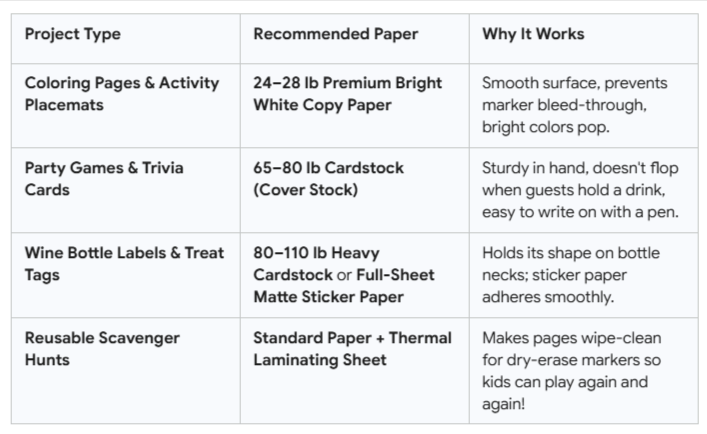
Standard copy paper (20 lb / 75 gsm) is fine for quick drafts, but picking the right weight instantly transforms your printables from flimsy sheets into keepsake items.
Here is what to use depending on what you’re making:
3. Printer Quality Settings (Speed vs. Rich Color)
Most home inkjet printers are set to "Draft" or "Standard" by default to save ink. For printable games and art:
For Text & Coloring Sheets: Standard quality is perfect and saves ink.
For Wine Tags & Party Games with Color: In your printer settings menu, change Quality to "High" or "Best", and set Paper Type to "Matte Photo Paper" or "Heavyweight Paper". This tells the printer to lay down richer, saturated ink layers.
4. Cutting & Assembling Like a Pro
If your printable comes with 2 games per sheet or individual tags:
Scissors vs. Paper Trimmer: A simple sliding paper trimmer ($10 at any craft store) gives razor-sharp, straight edges in seconds.
Hole Punches for Tags: Use a standard 1/4-inch single hole punch at the top of gift tags, then thread with natural jute twine, cotton string, or a velvet ribbon.
Need Quick Help?
All files in our Etsy shop are designed for instant gratification—download in 60 seconds, print immediately, and enjoy your gathering.
If you ever need a file resized, have trouble opening a PDF, or need troubleshooting for your specific printer setup, drop me a message directly through my shop.
I respond within 24 hours and am always happy to help!